Policy and Procedure Template: A Free 10 Section Format to Copy, With a Filled In Example
Updated November 20, 2026.
Key facts
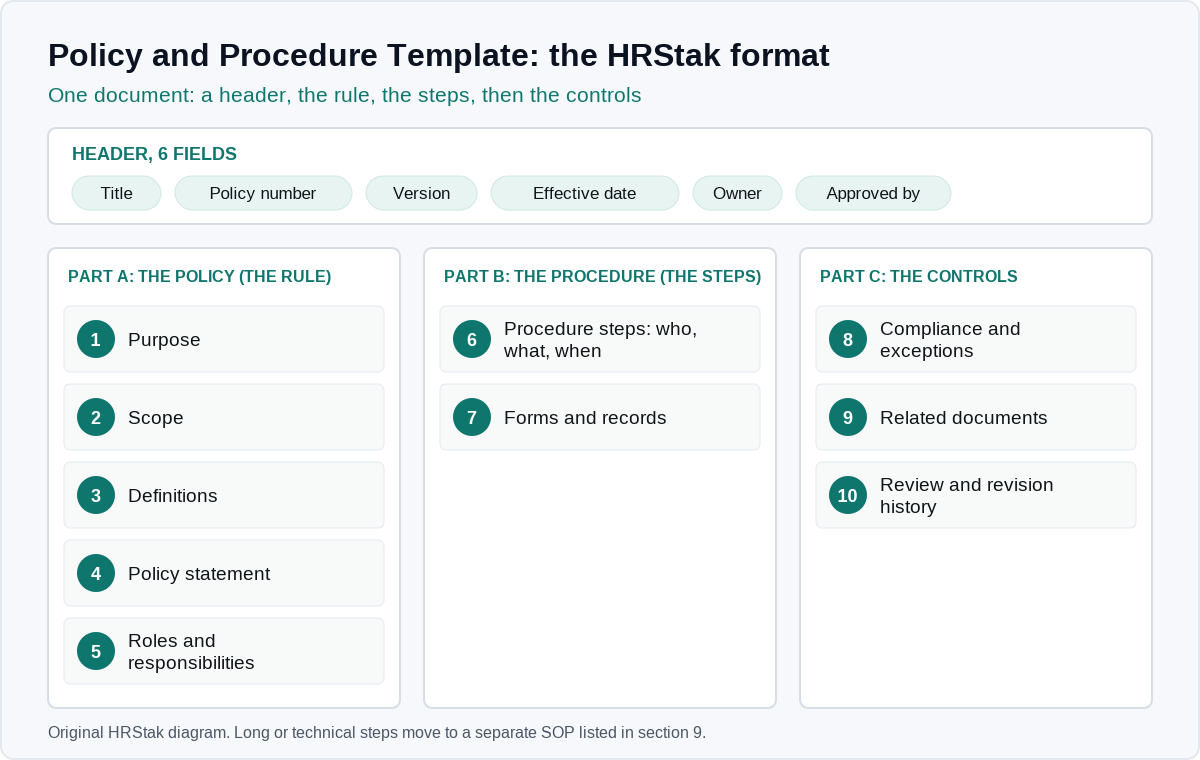
- HRStak's policy and procedure template has 10 sections plus a 6 field header block.
- Sections 1 to 5 state the rule; sections 6 and 7 hold the procedure steps.
- Review each policy and procedure at least every 12 months, and sooner when a law changes.
- HRStak Solo is $97 a month; HRStak team plans start at $249, with no free trial.
- These facts were checked against HRStak's plans and this template in November 2026.
What is a policy and procedure template?
A policy and procedure template is a standard layout your team uses for every workplace rule, so each one answers the same questions in the same order. HRStak's version puts the policy and its procedure in one document because that is what a small HR team can actually maintain: an employee opens one file and finds the rule, the steps, the form and the person to ask.
The two halves still do different jobs, and a policy and procedure template only works if you keep them apart inside the document:
| Part | What it answers | Who reads it most | How often it changes |
|---|---|---|---|
| Policy | What the rule is, why it exists, who it covers, who owns it. | Every employee it covers | Rarely. Reviewed on a schedule. |
| Procedure | The steps to follow the rule, who does each one, and by when. | The people doing the task, and their managers | Whenever the process, form or system changes. |
| SOP | Detailed instructions for one routine task, often with screenshots. | The person doing that one task | Whenever the task changes. |
The policy and procedure split follows the distinction drawn by Weill Cornell Medicine's policy office and PowerDMS, listed under sources below.
HRStak's step by step policy writing guide covers the wording rules (must, must not, may, should) and the eight components of the policy part in depth. This page is the format itself, ready to copy, with the procedure half added.
The policy and procedure template to copy
Copy this HRStak policy and procedure template into Word or Google Docs and replace every bracket. Delete the guidance in italics before you publish. Keep the numbering the same in every policy you write, so section 6 is always the procedure and section 10 is always the revision history.
[Policy title] Policy and Procedure
Policy number: [HR-00] Version: [1] Effective date: [date] Owner: [role, not a name] Approved by: [role] on [date]
1. Purpose. This policy sets [the rule in one line] so that [the reason: a legal duty, a risk, or a consistent practice]. One or two sentences.
2. Scope. This policy applies to [employee groups, locations]. It does not apply to [contractors, other groups]. Name who is out as clearly as who is in.
3. Definitions. [Term] means [definition]. Only terms two managers could read differently.
4. Policy statement. 4.1 [Role] must [obligation]. 4.2 [Role] must not [prohibition]. 4.3 [Role] may [permission]. Short numbered clauses, rules only, no steps.
5. Roles and responsibilities. Employees [do what]. Managers [approve or enforce what]. HR [owns the policy, answers questions, approves exceptions].
6. Procedure. Step 1: [role] [does what] by [deadline], recorded in [system or form]. Step 2: [role] [decides what] within [time]. Step 3: [role] [records or tells whom]. One action per step, in the order it happens.
7. Forms and records. [Form or system name], kept by [role] for [retention period you have confirmed].
8. Compliance and exceptions. Exceptions need written approval from [role]. Breaches are handled under [discipline policy name].
9. Related documents. [Other policies, SOPs, handbook section].
10. Review and revision history. Next review: [date, at most 12 months away]. Version [1], [date], [what changed], approved by [role].
Bracketed values are placeholders. The retention period and any notice or deadline that comes from law depend on where your employees work, so confirm them before you publish.
How to fill in each section of the policy and procedure template
Weill Cornell Medicine publishes section by section guidance for its own template, and the HRStak policy and procedure template needs the same kind of help. The table gives what to write in each section and the mistake that most often makes that section fail.
| # | Section | What to write | Common mistake |
|---|---|---|---|
| 1 | Purpose | The reason the rule exists now. | Restating the title instead of giving a reason. |
| 2 | Scope | Who and where it covers, and who it does not. | Forgetting part time staff, contractors or a second location. |
| 3 | Definitions | Terms that could be read two ways. | Defining obvious words and skipping the ambiguous one. |
| 4 | Policy statement | The rules, as numbered must, must not and may clauses. | Putting the steps here, so every new form forces a policy rewrite. |
| 5 | Roles and responsibilities | What employees, managers and HR each do. | Writing "management" with no role named. |
| 6 | Procedure steps | Numbered steps: role, action, deadline, record. | Steps written as the ideal, not as the work is really done. |
| 7 | Forms and records | The form or system used, and who keeps the record. | Naming a form nobody can find. |
| 8 | Compliance and exceptions | Who approves an exception and what a breach leads to. | No exception route, so managers invent their own. |
| 9 | Related documents | Linked policies, SOPs and the handbook section. | Links to superseded versions. |
| 10 | Review and revision history | Next review date and what changed in each version. | No date, so the policy quietly goes stale. |
The 5 key areas of a good policy
Five sections of the HRStak policy and procedure template carry the weight, and a policy missing any of them cannot be applied fairly. They are the areas to check first when you review someone else's draft.
- Purpose: a reader who knows why the rule exists follows it more consistently.
- Scope: without it, managers disagree about who the rule covers.
- Policy statement: the rule itself, in words that can be checked.
- Roles and responsibilities: a named role for each duty, including the owner.
- Compliance and review: what happens on a breach, who grants exceptions, and when the policy is next reviewed.
Definitions, the procedure, forms and related documents make the policy easier to follow. HRStak's template still keeps all ten, because skipping them is how procedures end up living in one person's head.
How to write a procedure template, and when you need an SOP
Section 6 of the HRStak policy and procedure template is where most drafts go wrong, because people write a paragraph instead of steps. Write each step as one line with four parts:
| Step | Who | Action | When | Record |
|---|---|---|---|---|
| 1 | [Role] | [Plain verb and object] | [Deadline] | [Form or system] |
| 2 | [Role] | [Decision, with what happens on yes and on no] | [Time limit] | [Where the decision is logged] |
| 3 | [Role] | [Follow up action] | [Deadline] | [Record kept] |
PowerDMS recommends one more check before you publish: give the draft procedure to someone who has never done the task and ask them to follow it exactly. Every place they stop or skip ahead is a missing step.
What is a standard operating procedure template? A standard operating procedure (SOP) template is a format for the detailed instructions to complete one routine task the same way every time: purpose, scope, roles, the systems or materials used, numbered steps, and records. In the HRStak policy and procedure template, an SOP is the overflow for section 6. When a procedure needs more than about 10 steps, screenshots, or different steps for different teams, write it as a separate SOP and list it in section 9, so the policy stays short.
Worked example: a PTO policy and procedure for a 40 person company
This worked example fills in the HRStak policy and procedure template for a fictional 40 person company with offices in two states. The numbers are sample choices, not legal requirements: paid time off accrual, carryover and payout rules vary by state, so check yours before you copy any value.
- Header. Title "Paid Time Off Policy and Procedure", policy number HR-07, version 1, effective January 1, 2027, owner HR manager, approved by the CEO.
- Scope. All 40 employees on the payroll, full and part time. Contractors and the 3 seasonal temps placed by an agency are out of scope.
- Policy statement. 4.1 Full time employees accrue 15 days of PTO a year. 4.2 Employees may carry over up to 5 unused days into the next year. 4.3 Employees must not take more than 10 consecutive working days without HR approval.
- Procedure. Step 1: the employee requests planned PTO in the HR system at least 10 working days before the first day off. Step 2: the manager approves or declines within 2 working days. Step 3: HR updates the balance within 1 working day of approval.
- Exceptions. HR may approve a negative balance of up to 3 days, recorded on the request.
- Review. Next review January 2028. Revision history: version 1, January 2027, first issue.
The finished statement and procedure sections read like this:
4. Policy statement. 4.1 Full time employees accrue 15 days of paid time off a year, prorated for part time employees. 4.2 Employees may carry over up to 5 unused days into the next calendar year. 4.3 Employees must not take more than 10 consecutive working days of PTO without written HR approval.
6. Procedure. Step 1: The employee requests planned PTO in [HR system] at least 10 working days before the first day off. Step 2: The manager approves or declines in [HR system] within 2 working days. If two people on the same team ask for the same day, the earlier request is decided first. Step 3: HR updates the PTO balance within 1 working day of approval. Step 4: Unplanned absences are reported to the manager before the start of the shift and entered by the employee on return.
Notice what stayed out of section 4: the system name, the deadlines for managers, and the sick day call in rule. Those live in section 6, so moving to a new HR system next year changes the procedure and leaves the approved policy alone.
How to write policies and procedures with the template, in 6 steps
The HRStak policy and procedure template is step 4 of a six step process. The full method, with the wording rules and a before and after rewrite, is in HRStak's guide to writing a clear workplace policy; the short version is:
- Name the problem and the owner. Why the company needs this rule now, and the one role that keeps it current.
- Research the rules and current practice. Laws in every state or country where affected people work, plus any existing emails or habits that already set the rule.
- Talk to the people who will follow it. Managers and a few employees, so the procedure matches the real work.
- Draft from this template. Policy in sections 1 to 5, steps in section 6, in plain language.
- Review and approve. Subject experts, employment counsel for leave, pay, discipline or accommodation, then the approver named in the header.
- Publish, train and schedule the review. One live copy, acknowledgments where needed, and a review date at most 12 months out.
Which HR policies need a procedure section?
Not every policy written with the HRStak policy and procedure template needs a long section 6. A rule that only says what is allowed can have one or two steps; a rule that triggers a request, an approval or a record needs the full step table.
| Policy | Procedure needed? | Why |
|---|---|---|
| Paid time off and leave | Yes, full steps | Requests, approvals, balances and records. |
| Anti-harassment | Yes, full steps | Reporting routes, investigation and follow up must be clear. |
| Remote work | Yes, short | A request and approval, then equipment and security rules. |
| AI acceptable use | Yes, short | A request route for new tools and a way to report a data exposure. |
| Dress code | Usually not | Mostly rules; an exceptions route in section 8 is enough. |
| Code of conduct | Short | Mostly rules, with a reporting step. |
For the AI rule specifically, HRStak's AI acceptable use policy guide lists the 12 sections and sample clauses that policy needs. For where all of these sit in one employee facing document, HRStak's employee handbook template has 15 sections with starter text.
Where HRStak fits in writing policies and procedures
HRStak is an AI workspace for HR teams, and it assists with the drafting step of a policy and procedure template; it does not decide which laws apply to you or replace legal review. The tools that touch policy work:
- Employee Handbook Section Writer (HRStak Solo, $97 a month, and every plan above it): drafts one policy section at a time from the topic, state and company size you choose, organized into purpose, scope and eligibility, policy details, procedures, exceptions, and state specific notes. That maps closely onto sections 1, 2, 4, 6 and 8 of the template above.
- AI Usage Policy Generator and Remote or Hybrid Work Policy Writer (HRStak Solo and every plan above it): draft those two policies from your industry, size and arrangements.
- Policy approval queue: saved handbook, AI usage and remote work policy drafts can be sent to a team admin, who approves or rejects them with a decision note. That gives you the "approved by" line in the header.
- Internal Knowledge Base (Workspace, $599 a month): answers employee questions from approved policies you upload and names the source file.
HRStak drafts in 8 languages and exports PDF and DOCX. All tools are listed on the HRStak HR AI tools page. Team plans start at $249 a month for Essentials, and there is no free trial of the HRStak workspace.
Frequently asked questions about policy and procedure templates
What is a policy and procedure template?
What is the difference between a policy and a procedure?
What are the 5 key areas of a good policy?
How do you write a procedure template?
What is a standard operating procedure template?
How do you write policies and procedures?
Should policies and procedures be in one document or two?
What file format should a policy and procedure template be in?
Can AI write policies and procedures?
How much does HRStak cost for writing policies and procedures?
See which HRStak plan includes the policy drafting tools and the approval queue.
What changed
- November 2026: first published, with the 10 section template, section guidance, the procedure step format and the PTO worked example.
Sources & references
- Weill Cornell Medicine Office of Compliance, Policy Templates and Guidance, compliance.weill.cornell.edu
- Georgia Tech Policy Library, Policy Template, policylibrary.gatech.edu
- PowerDMS, How to write policies and procedures, powerdms.com
- HRStak plans and tool access, hrstak.com/pricing