AI Onboarding Chatbot: What It Should Answer for New Hires, How to Set One Up, and What It Costs
Last updated: November 7, 2026 · HRStak prices read from the HRStak pricing page on November 7, 2026 · HRStak sells an employee chatbot
Key facts about AI onboarding chatbots and HRStak
- HRStak Workspace Pro includes the employee chatbot and triage inbox for $999 a month.
- HRStak Workspace Pro caps the employee chatbot at 500 answers a month.
- HRStak Workspace, $599 a month, has an HR-facing Knowledge Base with 150 chat answers a month.
- Gallup: only 12% of employees strongly agree their organization does a great job onboarding.
- HRStak prices checked November 2026; the Gallup figure was read October 2026.
What an AI onboarding chatbot is, and how it differs from an HR chatbot
An AI onboarding chatbot is an HR chatbot pointed at one audience, the people in their first 90 days, and loaded with the documents that audience needs. HRStak treats the two as the same product with a different job: the employee chatbot in HRStak Workspace Pro answers from whatever approved documents you upload, so it becomes an onboarding chatbot when you load the onboarding set and put the link in front of new hires.
The difference matters for what you load and how you judge it. A general HR chatbot is measured on the whole company's repeat questions. An AI onboarding chatbot is measured on one thing: did the new hire get through preboarding and the first month without waiting on HR for an answer that was already written down. For the company-wide version, HRStak's guide to HR chatbots for every employee covers the vendor categories and the four ways they fail.
The phrase also gets used for two things this HRStak guide does not cover. Customer onboarding chatbots walk a new software customer through a product, which is a different market. And recruiting chatbots talk to applicants before an offer; HRStak's AI for recruiting guide covers that side, where a recruiter stays in charge of every decision.
What new hires ask an AI onboarding chatbot, stage by stage
The questions a new hire asks an AI onboarding chatbot change by week, and each one should map to a document you own. HRStak built this table from the onboarding stages in its preboarding to day 90 onboarding checklist: for each stage, the questions that come up and the file the chatbot needs in order to answer them. If you do not have the file, the chatbot cannot answer, and that gap is your first writing job.
| Onboarding stage | Typical new hire questions | Document the chatbot answers from | Route to a person |
|---|---|---|---|
| Preboarding (offer signed to day one) | What time do I arrive? What do I bring for my I-9? What is the dress code? | Welcome letter, first day schedule, I-9 document list | Start date changes, offer terms |
| Day one | Where is my desk or my login? Who do I ask for help? When is lunch? | First day agenda, IT setup guide, team contact list | A laptop that never arrived |
| Week one | How do I submit expenses? How do I book time off? Which tools do I need? | Expense policy, PTO policy, tool list by role | Pre-booked leave the manager has not seen |
| First 30 days | When does my health coverage start? When is my first paycheck? How do I enroll? | Benefits summary, payroll calendar, enrollment steps | A pay amount that looks wrong |
| Days 31 to 90 | How long is probation? What happens at my 90 day review? How do I find training? | Probation policy, review timeline, training catalog | Anything about performance or job security |
Read the right-hand column as a rule, not a suggestion. A new hire asking about a wrong paycheck in week three needs a person who can look at their record, and an onboarding chatbot that answers from the general payroll calendar will make that worse.
Benefits of an AI onboarding chatbot for new hires and HR
The benefits of an AI onboarding chatbot come from one fact: most onboarding questions already have a written answer that the new hire cannot find. HRStak sees four real gains when the documents behind the chatbot are current.
- Answers outside office hours. New hires read the welcome email at night and on the weekend before they start. Enboarder reports that in its customer interaction data, 6 in 10 employee questions arrive outside working hours, which no HR inbox covers.
- Fewer repeat questions for HR. The I-9 document list, the parking question, and the benefits start date stop arriving one email at a time for every new hire.
- The same answer for every hire. A new hire in the smallest office gets the answer headquarters gets, because both read the same file.
- A list of what your onboarding documents are missing. Every question the chatbot could not answer tells you which page of the handbook to write next. This is the benefit most teams undervalue.
None of this fixes a weak onboarding plan. Gallup reports that only 12% of employees strongly agree their organization does a great job onboarding new employees, and most of that gap is people and planning: the manager's first week, real goals, and a buddy who shows up. An AI onboarding chatbot frees HR time for that work. It does not do it.
AI onboarding chatbot features to check before you buy
Feature lists for AI onboarding chatbots look alike, so HRStak suggests checking six things in the demo, using one of your own documents. HRStak's own answer is given for each, including the ones where it is the wrong fit.
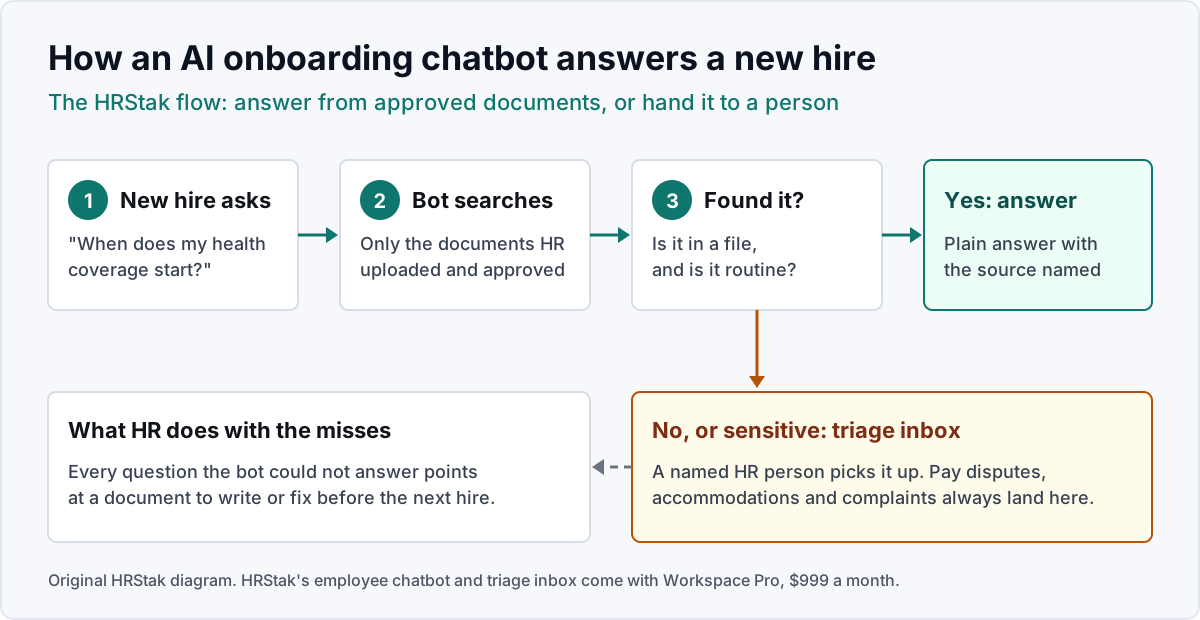
- Answers only from your approved documents. Ask a question your handbook answers and one it does not. The right behavior is a sourced answer to the first and "I do not have that, here is how to reach HR" to the second. HRStak's chatbot answers from uploaded policies and names the source file. Until you upload your own, it answers from sample benefits text, so load your documents before you share the link.
- A triage inbox with a named owner. Unanswered questions need somewhere to go. HRStak's chatbot opens a triage ticket for each question your documents do not answer; it does not sort out sensitive topics on its own, so point those to HR inside the documents. HRStak includes the triage inbox with the employee chatbot on Workspace Pro rather than selling it separately.
- Where new hires reach it. Some onboarding chatbots live in Slack or Microsoft Teams; Workativ and Leena AI lead with that delivery. HRStak's chatbot runs in the browser workspace with no Slack or Teams app, so the link has to sit in the welcome email and the onboarding checklist.
- A published answer limit. Chatbots in this category are priced by answers or by employee. HRStak publishes its cap: 500 employee answers a month on Workspace Pro.
- Document updates without the vendor. When the PTO policy changes, HR should be able to replace the file the same day.
- Employee data handling. New hires ask about tax forms and identity documents. Ask every vendor, HRStak included, what is stored and whether your documents train anyone else's model.
Features some onboarding chatbots add, such as scheduling meetings, sending follow-up nudges, and running engagement pulse surveys, belong to onboarding platforms and HR systems. HRStak's comparison of AI onboarding tools by type and price sorts those products, from Enboarder to BambooHR, by what their AI actually does.
Where an AI onboarding chatbot should stop
An AI onboarding chatbot should stop at anything that needs judgment, a record lookup, or a legal sign-off, and HRStak routes those to the triage inbox instead of guessing. Four kinds of onboarding question belong to a person from the first message:
- I-9 and right to work verification. A chatbot can list the acceptable documents from your own guide. The employer still has to examine the documents and complete the form; USCIS publishes the rules and the list of acceptable documents on its Form I-9 page.
- Pay and offer terms. A missing first paycheck or a salary that does not match the offer letter needs someone who can see the record.
- Accommodation and health questions. A request for a workplace accommodation starts a process with legal duties. It goes to HR, not a bot.
- Complaints. A new hire reporting harassment or a bad first week with their manager needs a human conversation the same day.
The other limit is the documents. An AI onboarding chatbot is exactly as current as the last upload, so a benefits summary from last plan year gives every new hire last year's answer. Give one person the job of replacing files before each new hire cohort starts.
How to set up an AI onboarding chatbot in five steps
Setting up an AI onboarding chatbot is mostly document work, and HRStak's setup follows the same order as any vendor's. Plan on the onboarding set first, the bot second.
- Collect the onboarding documents. The welcome letter, first day agenda, IT setup guide, handbook, benefits summary, PTO and expense policies, and the probation policy. Delete superseded versions. If the handbook needs work, HRStak's employee handbook template lists the 15 sections to cover.
- Test it with real questions. Pull the questions your last few new hires emailed HR and run each through the chatbot. Fix the source document when an answer is wrong, not the question.
- Name the triage owner. One HR person reads the triage inbox every working day during a new hire's first month.
- Put the link where new hires look. The offer acceptance email, the welcome letter, and the first line of the onboarding checklist. A browser chatbot nobody can find answers nothing.
- Review the misses after 30 days. Read every question that went to triage and write or fix the document behind it before the next cohort starts.
HRStak's drafting tools can write the missing pieces the review turns up. The Onboarding Checklist Generator drafts Day 1 through Month 1 checklists by role and by remote, hybrid, or on-site work, from HRStak Essentials at $249 a month.
Worked example: sizing an HRStak onboarding chatbot for a 150-person company
This HRStak worked example sizes the employee chatbot for a 150-person company that hires 6 people a month. The headcount, hiring rate, and question count are example inputs; the prices and caps are HRStak's published numbers.
- Pick the plan by headcount. 150 employees is above the 50-employee cap on HRStak Essentials. The employee chatbot is only on HRStak Workspace Pro, which covers up to 500 employees, at $999 a month or $9,950 a year.
- Estimate the new hire load. If each of the 6 new hires asks 20 questions in their first 30 days, that is 6 x 20 = 120 answers a month.
- Check what is left for everyone else. The cap is 500 employee answers a month, so 500 minus 120 leaves 380 answers for the other 144 employees, about 2.6 each.
- Work out the cost per answer. At full use, $999 divided by 500 is about $2.00 an answer on monthly billing. On annual billing, $9,950 divided by 12 is about $829 a month, or about $1.66 an answer.
- Decide if it is worth it. If HR spends 5 minutes on each of those 120 new hire answers by email today, that is 600 minutes, or 10 hours a month. Compare those 10 hours with the $999, and remember the same plan also includes 5 HR users, 10 managers, and all 81 HRStak tools.
If your numbers come out at a few new hires a year, the cost per answer climbs fast and the next section applies.
What an AI onboarding chatbot costs, with HRStak's published prices
AI onboarding chatbot pricing is usually quoted per employee or per answer, so HRStak suggests turning every quote into a monthly total at your headcount. Most vendors in this category, Leena AI and Enboarder included, quote rather than publish. HRStak publishes its prices, read from the HRStak plans and prices page on November 7, 2026:
| HRStak plan | Monthly price | Company size | Chat answers |
|---|---|---|---|
| HRStak Solo | $97 | Up to 50 employees | No chatbot; drafts 28 kinds of HR documents |
| HRStak Essentials | $249 | Up to 50 employees | No Knowledge Base, no employee chatbot |
| HRStak Workspace | $599 | Up to 200 employees | 150 Knowledge Base answers a month, for the HR team |
| HRStak Workspace Pro | $999 | Up to 500 employees | 500 employee chatbot answers a month, with the triage inbox |
The plan that puts an AI onboarding chatbot in front of new hires is HRStak Workspace Pro. HRStak Workspace's Knowledge Base answers HR's own questions from the same documents, which helps the HR person answering new hires, but new hires do not use it themselves. HRStak has no free trial. For the wider price picture across AI HR assistants, HRStak's AI HR assistant pricing guide sets these numbers against the rest of the market.
Who an AI onboarding chatbot from HRStak is not for
HRStak's onboarding chatbot is the wrong buy for three kinds of company, and each has a better option:
- A company that hires a handful of people a year. At $999 a month the cost per new hire answer is high. Better: a one-page new hire FAQ added to the welcome letter, and HRStak Solo at $97 a month if you want help drafting the letters.
- A team that needs the chatbot inside Slack or Microsoft Teams. HRStak runs in the browser only. Better: a chat-native vendor such as Workativ or Leena AI.
- A company that wants the bot to do onboarding tasks. HRStak does not collect forms, create accounts, or track tasks. Better: an HR system such as BambooHR, which includes onboarding checklists and e-signatures from $10.25 per employee a month, or Rippling for device and app setup.
Where HRStak fits as an AI onboarding chatbot
HRStak is an AI workspace for HR teams, and its employee chatbot is one part of it: the same approved documents answer new hires and feed the drafting tools HR uses to write the onboarding plan, the offer letter, and the 30 day survey. HRStak assists the people running onboarding; it does not make hiring, probation, or pay decisions, and it is not an HRIS, payroll, or an applicant tracking system. For where AI fits across the rest of HR, HRStak's guide to AI for HR in 2026 compares ten products, and the 81 HRStak AI tools list what the workspace drafts.
AI onboarding chatbot: frequently asked questions
What is an AI onboarding chatbot?
What questions can an onboarding chatbot answer?
Does the HRStak onboarding chatbot work in Slack or Microsoft Teams?
How much does an AI onboarding chatbot cost?
How long does it take to set up an onboarding chatbot?
Is an AI onboarding chatbot worth it?
Will an onboarding chatbot replace HR or the onboarding buddy?
Does HRStak have a free trial?
What changed on this AI onboarding chatbot guide
- November 2026: HRStak first published this guide, with the stage by stage question table, the feature checks, a five step setup, a 150-person worked example, and HRStak prices read November 7, 2026.
Sources & references
- HRStak pricing page (Solo $97, Essentials $249, Workspace $599, Workspace Pro $999 a month; Workspace Pro $9,950 a year; Knowledge Base chat 150 answers a month on Workspace; employee chatbot and triage inbox with 500 answers a month on Workspace Pro; Essentials up to 50 employees, Workspace up to 200, Workspace Pro up to 500; Workspace Pro with 5 HR users and 10 managers), hrstak.com/pricing, read November 7, 2026
- Gallup, Creating an Exceptional Onboarding Journey for Your New Employees (only 12% of employees strongly agree their organization does a great job onboarding new employees), gallup.com, read October 29, 2026
- Enboarder, AI onboarding tools guide 2026 ("6 in 10 employee questions arrive outside working hours" in Enboarder customer interaction data), enboarder.com, read October 29, 2026
- BambooHR pricing (Core from $10.25 per employee a month; onboarding checklist and e-signatures on all plans), bamboohr.com/pricing, read October 29, 2026
HRStak's employee chatbot and triage inbox come with Workspace Pro at $999 a month, with 500 employee answers a month.